beta 3.3.6For OpenCode · Windows & Linux · Free & open source
Keep OpenCode working when you hit the free limit.
openhop gives OpenCode a fresh internet address the moment the limit appears, then tells it to continue. Your chat just keeps going.
Free · No account · Nothing to configure
- 12:04:51opencodeFree limit reached
- 12:04:51openhopLimit spotted. Getting a fresh address…
- 12:05:01address104.28.•••.17162.159.•••.8
- 12:05:02openhopSent “continue” for you
- 12:05:02statusWorking again
- Version
- 3.3.6 beta
- Runs on
- Windows 10 / 11 · Linux
- Needs
- OpenCode + Cloudflare WARP (free)
- Download
- openhop.exe · 20.7 MB
- Licence
- MIT, open source
- Price
- Free
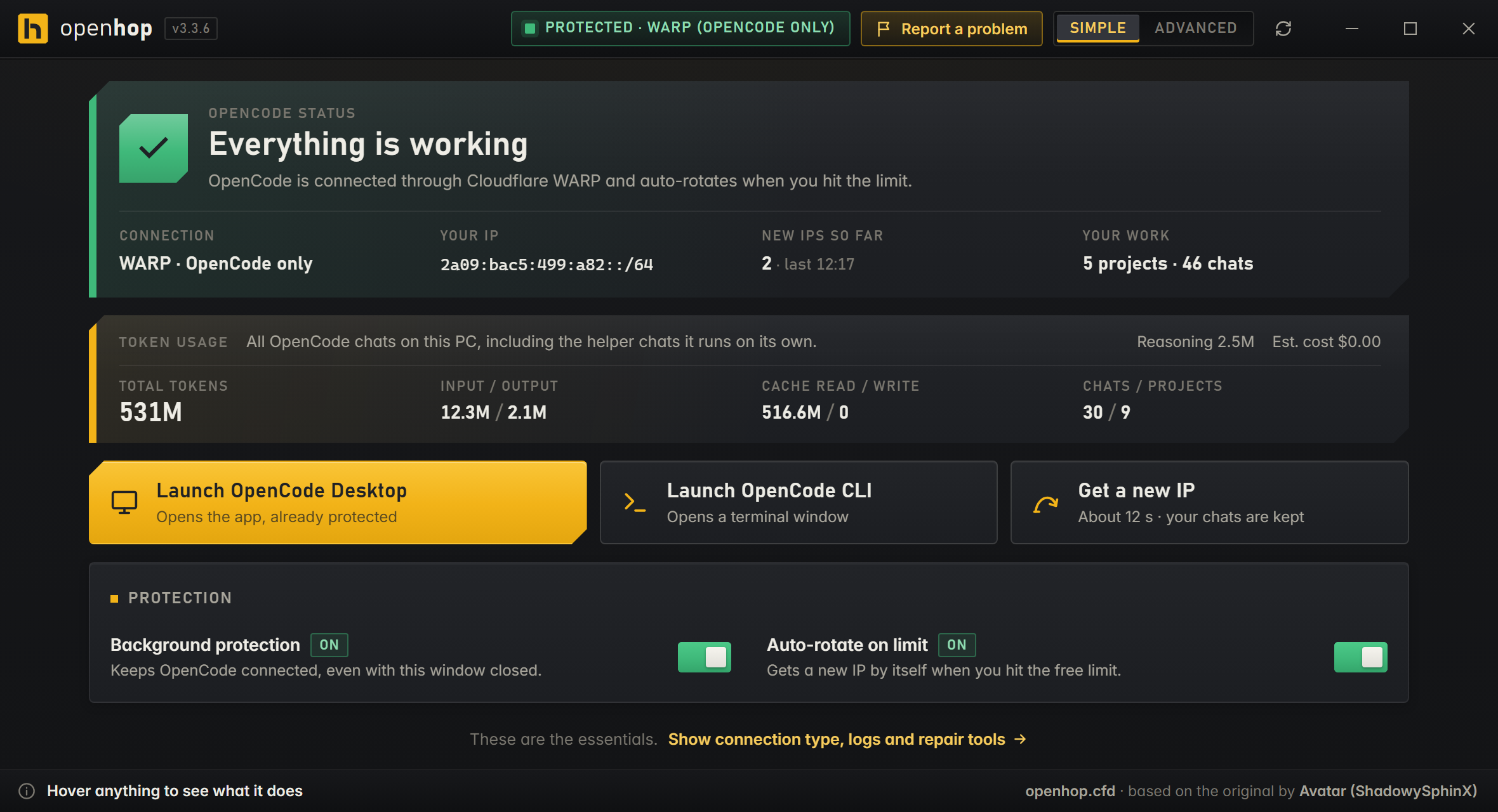
01How it works
A small helper that sits between OpenCode and the internet.
OpenCode's free tier counts usage per internet address. openhop routes only OpenCode through a private connection and, when the limit shows up, switches that connection to a new address.
When the limit hits
- 01
Watch
openhop reads OpenCode's log and spots the free-limit message the moment it appears.
- 02
Hop
It asks WARP for a fresh address. Takes about 10 seconds. Your chats and history are never touched.
- 03
Continue
It clears the limit banner and sends “continue” for you, so the answer picks up where it stopped. No restarting, no copy-pasting, no shouting at the screen.
02Features
Built to be left alone.
Only OpenCode changes address
By default only OpenCode goes through WARP. Your browser, games and calls stay on your normal internet and never notice a hop.
Hops by itself
No button to press when the limit appears. Want a new address anyway? Get a new IP does it on demand.
Says “continue” for you
After a hop, the stuck answer resumes on its own. On OpenCode Desktop and the CLI.
Fix everything
A health panel explains problems in plain words. One button checks every part and repairs what it can.
Lives in the tray
A coloured dot by the clock: green, amber or red. Small notifications when something needs you. Starts with Windows (you can turn that off).
Pick your route
WARP for OpenCode only, WARP for the whole PC, Tor, your own proxy list, or “clean endpoints” for networks where Cloudflare is slow.
Nothing leaves your PC
No servers, no accounts, no tracking. openhop runs on your computer and collects nothing. Its only outbound contact is openhop.cfd, to look for new versions (you can turn that off). The site counts those checks per day without storing IP addresses. Your chats stay where they are.
Linux too
Scripts for desktops, servers and VPS: two systemd services, WARP in local-proxy mode, SSH and normal routing untouched.
03Install
A few minutes, four steps.
Windows
- 1
Install OpenCode
The Desktop app or the
opencodecommand, from opencode.ai. Open it once so it sets itself up. (A process called “bun” in Task Manager is OpenCode, not openhop.) - 2
Install Cloudflare WARP
The free “1.1.1.1” app from one.one.one.one (the Windows version). Open it once and accept its terms. No account needed, and you don't have to switch it on: openhop does that.
- 3
Download
openhop.exeand open itNothing to install: it runs from anywhere. The first time it can take up to a minute to appear while Windows checks it. Open it once and wait, don't double-click again. The first screen checks that WARP and OpenCode are there and sets everything up. openhop updates itself.
- 4
Use OpenCode as usual
That's it. If the dot by the clock isn't green, open openhop and press Fix everything.
“Windows protected your PC”?
openhop isn't signed with a paid certificate yet, so Windows may warn you the first time. Click More info, then Run anyway. Every line of code is on this site, and you can check the file's SHA-256 below.
You need
- Windows 10 or 11 (64-bit)
- OpenCode: the Desktop app or the
opencodecommand (opencode.ai) - Cloudflare WARP, the “1.1.1.1” app (free, one.one.one.one)
- Microsoft Edge WebView2, which Windows 10 and 11 normally already have
- No Python, no coding
Linux
Download the source zip, unzip it and run the installer from the folder. Works on Debian/Ubuntu, Fedora, Arch, openSUSE and NixOS.
unzip openhop-source-c8cfb4c.zip
cd openhop-c8cfb4c
bash install.sh
It installs two systemd services (keeper + guard), runs WARP in local-proxy mode so your normal routing and SSH are never touched, and adds -hop and -doctor commands. On a Linux desktop, install xdotool for automatic “continue”.
04Download
Downloads
Every file is served from this site. The SHA-256 lets you check you got exactly the published file.
-
Windows app
openhop.exePortable, no installer. Windows 10 / 11. Updates itself. v3.3.6 beta.
-
Source code
openhop-source-c8cfb4c.zipEverything in Source, as a zip. Commit
c8cfb4c, 16 Nov 2026. -
Checksums
SHA256SUMSSHA-256 of the release files, as a text file.
To check a file: in PowerShell run Get-FileHash .\openhop.exe, on Linux sha256sum openhop.exe, and compare with the SHA-256 above.
05FAQ
Questions people actually ask.
Is it safe?
openhop is open source: you can read every line in Source. It runs only on your PC, has no servers and no accounts, and collects nothing. Each download shows its SHA-256 so you can check it's the published file.
It does change a few things on your PC to do its job. They're listed under “What does openhop change on my PC?” below, and Uninstall puts them back.
Does it change my whole PC's IP address?
No. By default openhop uses Only OpenCode mode: OpenCode goes through WARP, everything else (browser, games, calls) stays on your normal connection and isn't interrupted when openhop switches address. You can choose Whole PC if you want, but you don't have to.
What is Cloudflare WARP?
A free app from Cloudflare, also called “1.1.1.1”. It's a bit like a VPN. openhop uses it to give OpenCode a different internet address and to get a new one when needed. The free plan is enough, and you don't need an account.
Windows says “Windows protected your PC”. What do I do?
Click More info and then Run anyway. Windows shows this for apps that aren't signed with a paid certificate, which openhop isn't (yet). If you want to be sure the file is the real one, compare its SHA-256 with the one in Downloads.
openhop doesn't open, or opens and closes by itself. What do I do?
- Wait a minute. The first start can be slow while Windows checks the file. Opening it again doesn't help.
- Look by the clock. Click the
^arrow next to the clock: openhop may already be running there. - Antivirus. Open Windows Security → Virus & threat protection → Protection history (or your antivirus's quarantine). If openhop is listed, allow or restore it. Antivirus programs often stop apps that aren't signed yet.
- WebView2. If openhop says WebView2 is missing, install the “Evergreen” runtime from Microsoft and open openhop again.
- Still nothing? Paste
%LOCALAPPDATA%\openhop\logsinto the File Explorer address bar. When you ask for help, sharestartup.log(andcrash.logif it's there). If theopenhopfolder doesn't exist at all, openhop was blocked before it could start: that's almost always the antivirus.
Will I lose my chats?
No. openhop never touches your projects, chats or history. After a hop it only removes OpenCode Desktop's “free limit” lock so the chat can continue.
What does openhop change on my PC?
- Cloudflare WARP's mode and protocol, when you pick a connection type.
- OpenCode's proxy setting, so OpenCode connects through openhop (
127.0.0.1:41987). - Two background tasks that keep the connection healthy and watch for the limit, plus an optional “start with Windows” entry.
- OpenCode Desktop's “free limit” lock, cleared after each hop. Chats are not touched.
- A check for new versions on openhop.cfd every few hours, so openhop keeps itself up to date. It sends nothing about you and can be turned off under openhop app.
How do I uninstall it?
Open openhop, switch to Advanced, and press Uninstall (under Setup). That stops the background protection, removes the startup tasks and puts OpenCode's settings back to normal. Then delete openhop.exe. Your projects, chats and the WARP app stay as they are. On Linux, run uninstall.sh from the source folder.
Does it cost anything? Does it work on a Mac?
It's free and open source (MIT licence). It works on Windows 10/11 and Linux. There's no Mac version.
06Fine print
Fine print
Disclaimer
openhop is an independent, unofficial project. It isn't affiliated with, endorsed by or sponsored by OpenCode (opencode.ai) or Cloudflare. Their names appear here only to say what openhop works with.
openhop is provided “as is”, without warranty of any kind. Use it at your own risk, and follow the terms of the services you use.
Credits & licence
openhop is based on the original Opencode Unlimited by Avatar (ShadowySphinX), released under the MIT licence, and keeps that licence.
Free to use, change and share. Read the licence.