> [!WARNING]
> **Beta.** openhop is being updated right now (November 15–16, 2026). This README is **not up to date** yet: some
> features, names and downloads it describes aren't released. Found a problem? Please [open an Issue](https://github.com/bernat-lol/openhop/issues).
>
> **Beta.** openhop se está actualizando ahora mismo (15–16 de noviembre de 2026). Este README **todavía no está
> actualizado**: algunas funciones, nombres y descargas que describe aún no están publicados. ¿Algo falla? [Abre un Issue](https://github.com/bernat-lol/openhop/issues).
Keep OpenCode working when you hit the free limit.
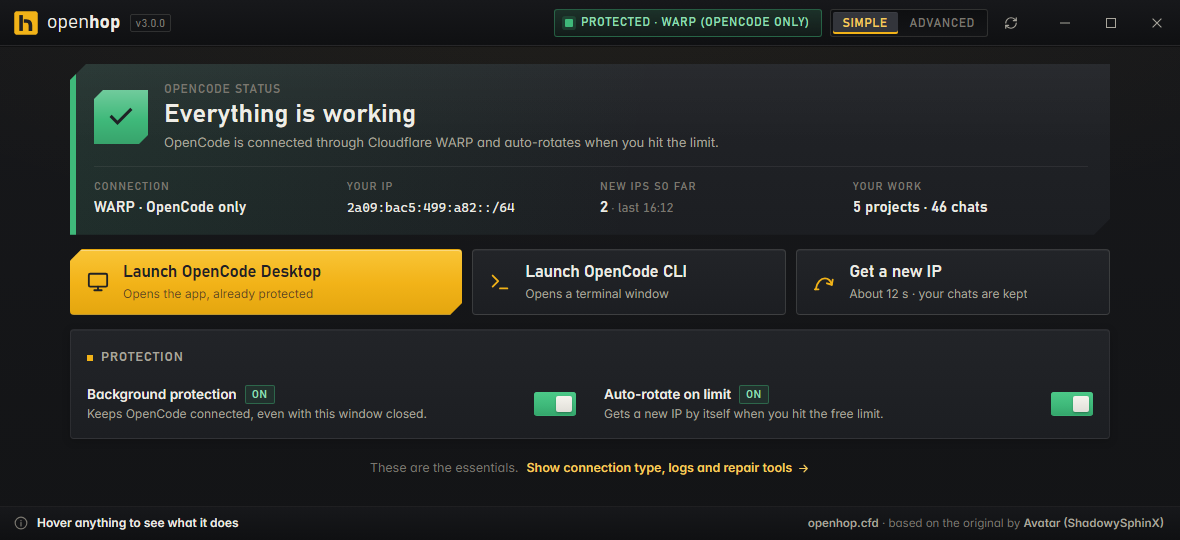
openhop gives OpenCode a fresh connection the moment the limit appears and tells it to continue, so your chat keeps going.
---
## What it does
[OpenCode](https://opencode.ai/) has a free tier with a usage limit. When you reach it, OpenCode stops answering and
shows a "free usage limit" message.
openhop runs quietly next to OpenCode and:
1. **Watches** OpenCode for the limit message.
2. **Hops** to a fresh internet address (through Cloudflare's free WARP app) in a few seconds.
3. **Continues** your chat automatically. The limit banner goes away and openhop sends "continue" for you.
Your chats and history are never touched. You just keep working.
## What you need
| | |
|---|---|
| **Windows 10 or 11** | Linux works too (see [For advanced users](#for-advanced-users)). |
| **OpenCode** | The Desktop app or the `opencode` command. [Get OpenCode](https://opencode.ai/) |
| **Cloudflare WARP** (free) | The "1.1.1.1" app. openhop uses it to get fresh addresses. [Get WARP](https://one.one.one.one/) |
You do **not** need Python or any coding knowledge.
## Install (2 minutes)
1. **Download** `openhop.exe` from **[openhop.cfd](https://openhop.cfd)** and double-click it.
It runs from anywhere, nothing to install. *(An installer, `openhop-setup.exe`, is coming.)*
2. **Open openhop.** The first screen checks that WARP and OpenCode are installed and sets everything up.
3. **Use OpenCode as usual.** That's it.
> **"Windows protected your PC"?** openhop isn't signed with a paid certificate yet, so Windows may warn you the first
> time. Click **More info → Run anyway**. The code is all here in this repository if you want to check it.
## Everyday use
openhop lives in the **tray** (the icons by the clock). The little dot on its icon tells you how things are:
| Dot | Meaning |
|---|---|
| 🟢 Green | Everything is working. |
| 🟡 Amber | Working, but something should be turned on (or openhop is switching to a new address). |
| 🔴 Red | OpenCode can't work right now. Open openhop and press **Fix everything**. |
**Right-click the icon** for quick actions:
- **Get a new IP:** switch address right now, without waiting for the limit.
- **Fix everything:** checks every part of openhop and repairs what it can, then tells you in plain words what it did.
- **Open openhop / Quit openhop**
Closing the window with **X** keeps openhop running in the tray. Use **Quit openhop** to close it completely.
openhop can start with Windows (on by default, you can turn it off in Settings).
You'll get a small notification when something needs your attention, and when openhop switched to a new address for
you. Each kind can be turned off.
### Simple and Advanced view
The app opens in **Simple** view: is it working, the fix button, launch OpenCode, get a new IP, protection on/off.
Switch to **Advanced** for everything else: connection types, logs, error history and expert settings.
### Connection type
- **Only OpenCode** *(recommended)*: only OpenCode goes through Cloudflare. Your browser, games and calls stay on
your normal internet and are never interrupted when openhop switches address.
- **Whole PC**: everything on your computer goes through Cloudflare WARP.
- **Advanced options:** Tor, your own proxy list, or "clean endpoints" for networks where Cloudflare is slow or blocked.
## Something isn't working?
Press **Fix everything** first. It solves most problems. If it doesn't, find your message below.
OpenCode says "Unable to connect" / ECONNREFUSED
openhop's background service isn't running, so OpenCode can't connect. Open openhop and press **Fix everything** (or the
**Start it** button in the red box). It usually takes a couple of seconds.
The "free usage limit" banner is still there
Wait about 10 seconds. openhop needs a moment to switch address and unlock the chat. If it stays, press
**Get a new IP**, or press Ctrl+R inside OpenCode Desktop.
WARP says "Network: unstable"
That's normal. WARP says it whenever the connection is a bit slow. Nothing is broken.
WARP keeps "Connecting…" or shows CF_HAPPY_EYEBALLS_MITM_FAILURE
Your network is blocking or slowing Cloudflare. Press **Fix everything**. If it keeps happening, go to **Advanced →
Connection type → Clean endpoints**, press **Test**, and apply the fastest one. In very restricted countries, try **Tor**.
"Port already in use"
An old copy of openhop (or of "Opencode Unlimited") is still holding it. Press **Fix everything**. Delete old `.exe`
versions you no longer use: an old version can replace the new background service with its older code.
Still stuck?
[Open an issue](https://github.com/bernat-lol/openhop/issues) and describe what you see. Screenshots help a lot.
## What openhop changes on your PC
openhop has no servers and collects nothing. Everything runs on your computer. To do its job it:
- switches Cloudflare WARP's settings (mode and protocol) when you pick a connection type;
- points OpenCode at openhop's local connection (`127.0.0.1:41987`) through OpenCode's own settings file;
- adds two background tasks that keep the connection healthy and watch for the limit, plus an optional "start with Windows" entry;
- clears OpenCode's "free limit" lock after switching address, without touching your chats.
**Uninstall** from Windows Settings → Apps (or run `uninstall.bat` if you used the portable version). That removes
the background tasks and restores OpenCode's settings.
---
## For advanced users
How it works
OpenCode's free limit is counted per internet address (an IPv6 `/64` block). openhop routes OpenCode through a small
local proxy on `127.0.0.1:41987` and sends that traffic out through Cloudflare WARP. When the limit appears in
OpenCode's log, it asks WARP for a new address, removes OpenCode Desktop's local `free-limit` lock from
`drafts.sqlite` (history tables are never modified) and sends `continue`.
```
OpenCode Desktop / CLI
│ HTTPS via 127.0.0.1:41987 (openhop proxy)
▼
┌─ Only OpenCode (default) ─▶ WARP local SOCKS5 :40000 (MASQUE) ─▶ Cloudflare ─▶ fresh IPv6 /64
├─ Whole PC ───────────────▶ WARP system tunnel (WireGuard)
├─ Clean endpoint ─────────▶ WARP pinned to an unthrottled Cloudflare IP
├─ Tor ────────────────────▶ 127.0.0.1:9050 / 9150 ─▶ new circuit per hop
└─ Custom proxies ─────────▶ your SOCKS5/HTTP pool, round-robin
```
Command line (Windows)
`openhop.exe --doctor` runs a health check in the terminal, `openhop.exe --hop` gets a new address, and
`openhop.exe --tray` starts in the tray. After setup, the `opencode` command is routed through openhop automatically,
and these commands work in any new terminal: `openhop` (open the app), `openhop-hop` and `openhop-doctor`.
Linux (desktop, server or VPS)
```bash
bash install.sh
```
Works on Debian/Ubuntu, Fedora, Arch, openSUSE and NixOS. Installs two systemd services (keeper + guard), runs WARP
in local-proxy mode so your server's normal routing and SSH are never touched, and adds `-hop` and `-doctor` commands.
On a Linux desktop, install `xdotool` for automatic "continue".
Run or build from source
```powershell
# get the code: the source zip on https://openhop.cfd, or
git clone https://github.com/bernat-lol/openhop.git
cd openhop
pip install -r requirements.txt
python src\openhop_app.py # run
powershell -ExecutionPolicy Bypass -File .\build.ps1 # build the .exe
```
Want to help? Open an [Issue](https://github.com/bernat-lol/openhop/issues) first to talk about the change.
---
## Disclaimer
openhop is an independent, unofficial project. It isn't affiliated with or endorsed by OpenCode or Cloudflare. Use it at
your own risk and follow the terms of the services you use.
## Credits
**openhop** · [openhop.cfd](https://openhop.cfd) · based on the original
[Opencode Unlimited](https://github.com/ShadowySphinX/Opencode-Unlimited-Limit-Bypass-) by **Avatar (ShadowySphinX)**.
## License
[MIT](LICENSE). Copyright (c) 2026 Avatar (ShadowySphinX). Modifications Copyright (c) 2026 openhop (https://openhop.cfd).